Categories
Software Development Ui & Ux Designs Web Development

7 Things to Consider when Selecting Your Domain Name

7 Things to Consider when Selecting Your Domain Name

Jun 21, 2016 | Web Development

Starting a new business? Your website doesn’t have to be a .com domain. Take a look at these 7 things to consider when selecting the right Top Level Domains for your online strategy.

7 Things to Consider when Selecting Your Domain Name Most people are familiar with the ubiquitous Top Level Domain (TLD) extensions like .com and .org, but when ICANN began opening up more generic TLDs in 2012 and 2013, the landscape changed. Don’t worry; choosing a less common TLD will not negatively affect search engine rankings.

In your search for all the right domains for your online strategy, consider these seven items when selecting your TLD:

  1. Provide Context: Recently the TLD .insurance was made available. When selecting TLDs, consider the customer. If they are navigating to your company at .insurance, they know what to expect when they click on the site.
  2. Establish Geographic Location: It goes beyond just country extensions like Canada (.ca) and the United Kingdom (.uk). Some cities have begun using site extensions as well. For example, the Eiffel tower moved its official page to www.toureiffel.paris.
  3. Selection is More Varied: The use of generic TLDs opens up the market for a wider variety of websites. If your company’s name is not available on .com, you have more options to choose from. Just make sure that it is logical and your customer will remember it!
  4. Improve Brand Recognition: Create shorter and more memorable domain names for your customers. In eConsultancy’s article reviewing branded TLDs, BMW was at the top of the list for next100.bmw as a great example of a simple domain name that conveys their message of showing their vision for the next 100 years.
  5. Enhance Brand Protection: Be strategic about the way you protect your brand. Consider if there are any TLDs that could negatively affect your brand or draw users away from your brand.
  6. Extend Creative Possibilities: Using generic TLDs gives more opportunity to be creative and memorable with the marketing of your website. Though they have recently announced an ownership transition, the social bookmarking web service Delicious was creative and effective with their domain name, del.icio.us.
  7. Incorporate Marketing Campaigns: In your next marketing campaign, instead of directing customers to a URL extension, you can send them to a dedicated domain. If you are promoting a Christmas holiday sale you could promote it on yoursite.blackfriday.

If you need assistance evaluating your online domain strategy, please contact us.

Categories
Software Development Ui & Ux Designs Web Development

What is a Website Bot?

What is a Website Bot?

Jul 22, 2016 | Web Development

Have you ever asked yourself if the visits to your website are truly people? Rest assured we are here to help explain what bots are and how they can impact your website.

What is an Internet or Website BotHave you ever asked yourself if the visits to your website are truly people? Is the spike in traffic due to recent marketing efforts or is it a bot? Rest assured we are here to help explain what bots are and how they can impact your website.

Defining a Website Bot

A website bot, also known as an internet bot, is automated software that runs a task on your website. These tasks are often simple and repetitive. There are good (legitimate) bots and there are bad (malicious) bots. Here are a few of the good bots:

  • Spider Bots: These bots are used to index websites primarily for search engines. They help with the ranking of your website.
  • Media Bots: A media bot is used to update specific types of content, such as weather, news, sports, etc.

There are a number of malicious bots that aim to disrupt your website and steal information. The most common malicious bots include:

  • Scrapers: A scraper bot will copy the content from your website which could include images, content, etc.
  • Hacker Bots: A hacker bot will attempt to find vulnerabilities in your website. It is similar to someone walking around your house trying every window or door to see where they can get in.

Are Bots Bad for your Website?

Internet bots are not always a bad thing. There are a number of bots that are good for your website, such as the Google Bot, Bing Bot, etc. These bots will scan your website in order to help your ranking within that search engine. Excluding those bots could impact your ability to be found online.

However, not all bots are good. There are malicious bots that intend to harm your website. It’s a constantly changing landscape so it’s important that your technical team is monitoring your website for any potential issues.

As you review your website performance, remember Google Analytics is all about trends. Whether you have 10 visits or 10,000 visits at the end of the day it doesn’t matter if they’re all from bots. The end goal is to continually increase the number of actual people finding your website.

If you need help reviewing your Google Analytics for bot traffic contact Informatics Inc.

Categories
Software Development Ui & Ux Designs Web Development

A Brief History of Digital Technology’s User Interface

A Brief History of Digital Technology’s User Interface

Apr 6, 2017 | Web Development

To know your present, you must know the past.

User Interface HistoryWhen computer systems were originally built, it was necessary to memorize codes and commands (What is UI/UX), but a system is only as good an individual’s ability to operate it. For widespread adoption of digital technology into everyday lives, a change was needed.

The tide changed in 1981 with a group of computer scientists at Xerox Palo Alto Research Center and two inventions that the computing world had not seen before: a graphical user interface (GUI) and a mouse. The group worked with a trained psychologist and engineer to build the system that grabbed the attention of Apple Computer. With this innovation, Apple was able to create the first commercially successful desktop computer with point and ‘point-and-click’ usability with the 1984 release of the Macintosh. (Apple History).

In the 1990’s and early 2000’s both computers and the increasing ability to access the internet led to a number of advances to improve the way that we interact with our technology including:

  • Integration of Drop-Down Menus
  • Introduction of Widgets
  • Use of Pen Based Interfaces
  • Inclusion of Unique Icons Used for Navigation
  • Introduction of Touch Screen Interfaces

In 2007 at MacWorld, it was Apple again that was behind the next huge leap in UI adoption with the unveiling of the iPhone and thus began the app revolution. Since then, the way that we interact with our phones has changed our daily lives. Today users spend 90% of their time in apps and have changed their behaviors based on the technology in the palm of their hands. For example, 69% of people now choose to research products online before going into the store for a final evaluation and purchase. (Webrooming Blog).

The only limit now is our imagination. At Informatics, we pride ourselves in our ability to create websites with cutting edge User Interface and User Experience. To learn more visit contact us today to get your next project started.

Categories
Software Development Ui & Ux Designs Web Development

Digital Marketing: Then and Now

Digital Marketing: Then and Now

Jul 7, 2017 | Web Development

Forty years ago, digital marketing did not exist. Today, it is a leading component of all businesses. Here is a brief history from the launch of the first personal computer to where we are today.

A History of Digital Marketing Forty years ago, digital marketing did not exist. Today, it is a leading component of all businesses. Here is a brief history from the launch of the first personal computer to where we are today.

1981 – IBM Launches First Personal Computer

Digital marketing as we know it today began to take shape in the 1980’s, shortly after IBM launched the first personal computer. Following this technological innovation, computers quickly became sophisticated enough to store large volumes of data.

1986 – ACT! Launches First Database Marketing Software

A contact and customer management company, ACT! introduced the first database marketing software in 1986. This software was able to store large volumes of customer contact information, making customer relations management easier than ever before.

1990s – Introduction of Customer Relationship Management (CRM) Software

The database marketing software of the mid-1980’s paved the way for the revolutionary marketing technology known as CRM software.

1996 – 16 Million Internet Users Worldwide

A far cry from today’s numbers, there were just 16 million internet users worldwide in 1995. Additionally, Americans spent an average of 30 minutes online per day.

1999 – The Birth of Salesforce.com

Up until the birth of Salesforce.com, marketers found that they had a lot of data from their CRM software but they did not have a way to make sense of it all. Salesforce.com was the first Software-as-a-Service (SaaS) company and served as the first company to deliver business applications from a website.

2000 – Dotcom Bubble Burst

On March 10th, “the dotcom bubble hit its peak then burst the following weekend” (Kapost). While many CRM companies of the 90s were hit hard, the burst prompted SaaS leaders to re-think their business models. By the mid-2000s, digital behavior dramatically altered the power dynamic between consumers and marketers.

2000s – Google and the iPhone Hit the Scene

As of 2002, the number of internet users worldwide had climbed to 558 million, up 3,388% in just 6 years. In 2004, Google went public, bringing the power of search to our home computers. And in 2007, the iPhone was born. Additionally, social media sites were beginning to emerge:

  • LinkedIn was founded in December, 2002
  • Facebook was founded in February , 2004
  • YouTube was founded in February, 2005
  • Twitter was founded in March, 2006

2007 – Marketing Automation is Born

Users began researching products online and making purchasing decisions before speaking with a salesperson, bringing a new challenge to marketers. In 2007, this challenge was met with marketing automation, software that enables marketers to launch multi-channel campaigns, segment audiences and serve up highly personalized content.

2010s – Transition from Tech-Savvy to Tech-Dependent

As of 2014, Americans spent an average of 11 hours online per day and came to expect load times of 250 milliseconds. Mayur Gupta referred to these changes of the past decade as a transition from “tech-savvy to tech-dependent”. Today, the marketing technology available is endless. There is officially an over-abundance of tools available, causing many marketers to feel overwhelmed. In fact, 68% of marketers feel more pressured to show ROI on marketing spend.

A lot has changed for digital marketing over the past few decades. If you need assistance keeping track of all the new technology and using it to your advantage, contact Informatics Inc. Our Digital Marketing team is well-versed in selecting the right tools and putting them to good use. Give us a call to learn more!

Source: https://kapost.com/history-of-digital-marketing-technology/

Categories
Software Development Ui & Ux Designs Web Development

Which Content Management System is Right for You?

Which Content Management System is Right for You?

Oct 10, 2017 | Web Development

Probably one of the most common questions I get is, “which content management system (CMS) should I use?” To me, that question is the same as someone asking me, “which tool should I use, a screwdriver or a sledgehammer?”

Content Management System Probably one of the most common questions I get is, “which content management system (CMS) should I use?” To me, that question is the same as someone asking me, “which tool should I use, a screwdriver or a sledgehammer?” Obviously, the answer to that question depends on what you’re trying to do – you choose the tool based on the project you are attempting to complete. CMS selection is the same – your selection should be based on your needs and what you are attempting to achieve.

Identifying Your Needs

The only thing consistent across all CMS platforms is that they are all different. At Informatics, we are technology agnostic – meaning we work with all types of technology and software. We don’t have a “go to” solution since every client’s needs are different. As such, our approach is requirements-based. We like to help our clients determine and prioritize their requirements first. Once that’s complete, we can make a recommendation.

So, what are examples of these requirements? Well, for some people, ease of use and WYSWIG (what you see is what you get) editing capabilities are most important. Others want to be able to edit on the page and prefer drag-and-drop capabilities. For some, the availability of many add-ons and modules is a top priority. Still others need an e-commerce system that easily integrates with QuickBooks. All these are possible – however there isn’t a single CMS that does all of these things extremely well. That’s why It is critical to prioritize your needs.

CMS Breakdown

There are hundreds of CMS options. Each one has strengths and weaknesses for you to consider. In addition to features, the underlying architecture can be a consideration. These systems can be written with open-source code and are free to use or they can be commercial systems that are purchased or require some sort of annual fee. They also range on a spectrum from most simple (and least flexible) to most complex (and most flexible).

At the simple end are hosted platforms like SquareSpace and Wix. These are great for getting going very quickly and are simple to use; however, they are also somewhat limited in their functionality and are best suited to very simple websites.

Next comes WordPress which runs almost 60% of the world’s websites. While originally starting as a blog platform, it has been adopted as a full-fledged platform with the largest number of add-ons to extend the very basic out-of-the-box functionality. However, WordPress is often the target of hackers and requires constant updates to keep it (and its add-ons) secure.

Next up are the middle ground systems like JoomlaConcrete5 and Sitefinity. These offer strong functionality and extensibility while still being relatively intuitive and easy to use. We have worked extensively with Concrete5 and have found it to be a superior choice for this level of CMS.

At the other end of the spectrum are systems like Drupal. It is one of the most flexible but less intuitive platforms and often preferred by large academic and corporate organizations. By less intuitive, I mean that it requires extensive training to become proficient with it. However, with the right technical background, it can be modified to meet just about any requirement.

So, What Do I Recommend?

Short answer? It depends. When you set out to find the best CMS for your needs, start by identifying your priorities. Or simply reach out to us, and we can help you figure out which CMS is right for you.

– John Osako | Partner, COO

Categories
Software Development Ui & Ux Designs Web Development

6 Things to Consider When Selecting a Web Development Company

6 Things to Consider When Selecting a Web Development Company

Oct 26, 2017 | Web Development

Nobody wants to pay for something twice. Yet, too often we hear from people who come to us because they have had a bad web development experience. That’s why when it comes to developing or upgrading your website, it pays to shop around.

Web Development CompanyNobody wants to pay for something twice. Yet, too often we hear from people who come to us because they have had a bad web development experience. Sometimes, they end up paying for web development services twice simply because they made the wrong choice when selecting a company to work with.

Orphan Sites

Over the years, we have worked with many clients who come to us with what we have dubbed “orphan sites”.

These are sites that were created by a friend, relative, or low-cost web developer who was moonlighting between jobs. At some point, usually when website updates are needed, these folks discover they are on their own when it comes to their website because their original web developer doesn’t respond to email or phone messages, has found a “real” job or is simply no longer interested or able to assist them in supporting their site.

That’s why when it comes to developing or upgrading your website, it pays to shop around and ask lots of questions to make your web dollars count.

6 Qualities to Look for In a Web Development Firm

If you are in the market to create a new website or update the one you have, here are the top five services, capabilities and qualifications you should expect from any serious web development firm you are considering.

1. Experience

It may be tempting to go with your cousin who is currently unemployed and “knows a lot about computers” but if you are building an online storefront that represents your business, it is best to go with a company that is experienced, has a proven track record and will be there to support your site after launch.

2. References

While a web development company can sing their own praises, referrals from their existing or past customers can give you a better idea of how they work. Would a past client work with them again? Would they recommend them to others? Ask for references and samples of their work.

3. Technical and Creative Expertise

Look for a company that understands programming so your site will look good in various browsers and/or screen resolutions and sizes. They should have the ability to create interactive forms, develop databases and understand the pros and cons of various content management systems and other tools on the market that allow you to make your own site updates. They should also be knowledgeable about new technologies and how those might apply to your needs. Along with technical know-how, they should exhibit excellent design skills so they can make your brand come alive and stand out from the rest.

4. Defined Process

Creating a website is a multi-disciplinary process that involves a blend of marketing and communications, technical expertise and creative aesthetics. Companies that do this well typically have a defined process with a dedicated project manager that keeps everything working smoothly.

5. Service and Support

Technology changes quickly. You want to make sure that whoever you go with will be available for support and service after your new site is launched and the project is complete. Websites are organic in nature and as your business needs change, you may want to add functionality and make improvements. Look for a long-term technology partner who will be there for you.

6. Search Engine Expertise

Let’s face it. Everyone wants to be number one in Google. That may not be realistic, but the company you select should have the ability to construct site elements that positively affect search engine rankings, including metatags, titles, text, links, and nonframe pages.

Be sure to do your homework. Shop around. Ask lots of questions. In the end, you should feel comfortable with the people you will be working with and confident that they are knowledgeable, competent and understand your business goals. To learn more about Informatics’ expertise, process and experience, contact us today!

– Maureen Kler Osako | Partner, CMO

Categories
Software Development Ui & Ux Designs Web Development

The Difference Between CSS and HTML

The Difference Between CSS and HTML

May 29, 2018 | Web Development

Learn about the two languages that have a profound impact on both the functionality and design of your website.

The Difference Between CSS and HTMLIf you make the commitment to understanding two of the most important languages your website is using, CSS and HTML,  you can then begin to understand the endless capabilities your site has! You’ve likely heard the terms before as they are vital to the creation of any web page. To begin, it may help to know the definition of each.

Well first, what do they stand for?

HTML – Stands for Hypertext Markup Language. It is the backbone of any and all web pages. A web page contains HTML in order to display images, text, and other resources through a web browser. At the highest level, it is simply a document organizer for your web page. The file extension for HTML is .html

CSS – Stands for Cascading Style Sheets. This is a language used to stylize your HTML elements. Web designers use CSS to efficiently customize their web page designs by changing things like fonts, colors, positions of elements, etc. The file extension for CSS is .css

How do they work together?

HTML is needed for all web pages to even exist, but CSS is actually optional. If you were to create a webpage using only HTML, it would still work because browsers do have built-in default styles. They’re not pretty, but they are functional and that is all that HTML really cares about, being functional. However, there are ways for both languages to be used together. When creating emails, modern email programs will now offer the ability to add custom CSS and HTML directly into the application. For example, you may insert an original image that is rectangular by using HTML but then use CSS to format it into a circular shape and then position it within the email in the very top left corner. However, it is important to note that an email has a lot less code involved than a website would. Although past practices included using the languages within the same file, it is now highly recommended to have separate .css and .html files for efficient development.

But creating separate files sounds like more work…

It’s actually not. Having a separate global .css file from your .html files saves designers a lot of work because CSS has the ability to easily assign a uniform layout/design for multiple pages at once. That’s why designers love it. Think about it this way, if you realized that you had to make your logo slightly larger on every single page It would take hours to add CSS to each page’s HTML file. With CSS you can add design features to classes that link to the classes you assigned in the HTML file. It is a great solution because it gives designers more time to focus on custom design while still maintaining that uniform look across an entire site.

Why is CSS all the rage right now? Responsiveness.

One of the best parts about using CSS is that it creates an opportunity to make your website responsive to any device that is being used to view it. HTML can only do so much when it comes to formatting. Using CSS, you can easily tell your website to change its layout once it hits an average mobile screen size. So, instead of your visitor having to squint to see those 3 images across the bottom of your site, they are now stacked on top of each other because the CSS is telling the HTML of your website, “Hey, I noticed this visitor is using their phone screen instead of a big computer screen, so let’s change the size and order of particular elements you have to make it easy for them to scroll through and find what they need”.

Again, to lay it out plain and simple, HTML provides the structure of a web page while CSS provides the visual layout (including responsiveness). There are many differences between the two, but when working together both languages can create unique and modern websites that cater to the needs of any business. This particular blog is meant to provide understanding at a very high level. We dive deeper into the coding world with our Informatics U courses. Our web developers eat, sleep and breathe these languages and that is why when you choose Informatics for your website redesign the results show! Contact us today to get started.

Categories
Software Development Ui & Ux Designs Web Development

Benefits of Using Chatbots on Your Website

Benefits of Using Chatbots on Your Website

Oct 24, 2019 | Web Development

Is your company interested in becoming more accessible to your clientele? View the following benefits of adding a Chatbot feature to your website.

ChatbotsImmediate communication has never been more important to consumers. In this day and age, where the answer to any question you may have is available at your fingertips, the expectation for an immediate response to questions is alive and well. From product inquiries to scheduling appointments, speed is key.

Chatbot Communication Solutions

Although a quick response time is important, it’s impossible for small to medium sized businesses to have a staff on hand 24/7. Luckily the development of Chatbots has created a reasonable solution to this issue.

Chatbots shouldn’t take over your entire online communication as many consumers still prefer speaking one-on-one with a person, but as technology advances so will the comfort level with using it for basic questions. Take a look at some of the other beneficial reasons why you should be implementing chatbots:

  • As stated above, having a staff on hand for 24 communication is not possible for most companies. Integrating a chatbot onto your website at least allows a basic level of constant communication. When your customers have a question long after your team has gone home for the night, they’ll be able to get the answer to their request.
  • Because there will never be a 100% drop in contact with your users, this will help increase leads and conversion rates.
  • Along with staying in communication, you can also alleviate some of the simpler and frequently asked questions from your support staff. This way your team will not only have more time to concentrate on other tasks, but they’ll also understand that the communication they do have with your customers pertains to more crucial subjects.
  • Dependent on the type of website you’re running, chatbots have the ability to incorporate learning technologies. You can use this information to not only have your team learn more about who your consumers are, but also program your chatbots to handle more advanced communications.

Although chatbots are a newer technology, they are quickly becoming a more standard option both on websites and social media. Stay ahead of the curve and remain in touch with your clients by installing this feature on your website. Not sure how to get this implemented? Feel free to contact the team at Informatics to get started!

Categories
Software Development Ui & Ux Designs Web Development

Ask Informatics: What is Headless Commerce?

Ask Informatics: What is Headless Commerce?

Jul 15, 2021 | Web Development

Can losing your head be good for business? If you’re in online retail or e-commerce, it’s true. A primer on headless commerce.

Headless businessman among the cloud

When it comes to the world e-commerce, it turns out losing your head can be a good thing.

In this case, we’re referring to headless commerce, a growing web development approach made possible by the Internet of Things (IoT).

You’ve probably already experienced it, and may have even heard the term, but what is it and what will it mean for e-commerce businesses?

What is headless commerce?

Headless commerce refers to the separation of the consumer-facing front-end (head) of an e-commerce system from its operational back-end. It allows developers and marketers to create unique, tailored experiences for different devices and platforms, all while maintaining the efficiency of shared infrastructure.

Compare that to traditional e-commerce platforms, which combine front- and back-end systems into one closed platform (called a monolithic approach). These platforms were fully featured and easy to use, but they were also more rigid in their design and flow. Marketers had few options for displaying content or product outside of pre-determined formats without time-consuming development work, and new technology support wasn’t always a given.

That may have been acceptable when e-commerce was limited to desktops and web browsers, but today’s multichannel shopper demands more flexibility. Headless commerce can provide it.

If you’ve shopped recently with a big online retailer, you’ve seen headless commerce in action. You can browse products on your smartphone, start the order on your laptop and checkout via smart speaker as you move through your day. Have it shipped to your home, or pick it up at the store so you can pick up the things you forgot.

No matter where you engage the retailer, your account is accurate, their inventory is up-to-date and the branding is consistent—all things that build customer loyalty and drive conversions.

The tools of headless commerce

Headless commerce centers around the use of application programming interfaces (APIs) to transfer data between front-end storefronts and a back-end system that includes components like your CRM, product content and payment gateways.

Developers can build custom front-ends for specific channels such as mobile, smartwatches and smart appliances, all of which make requests of the back-end via API. Because those front-ends all exist independently, they can be created with any language or platform and turned on/off as needed. (See the following graphic from commercetools for a visual representation of headless commerce in action.)
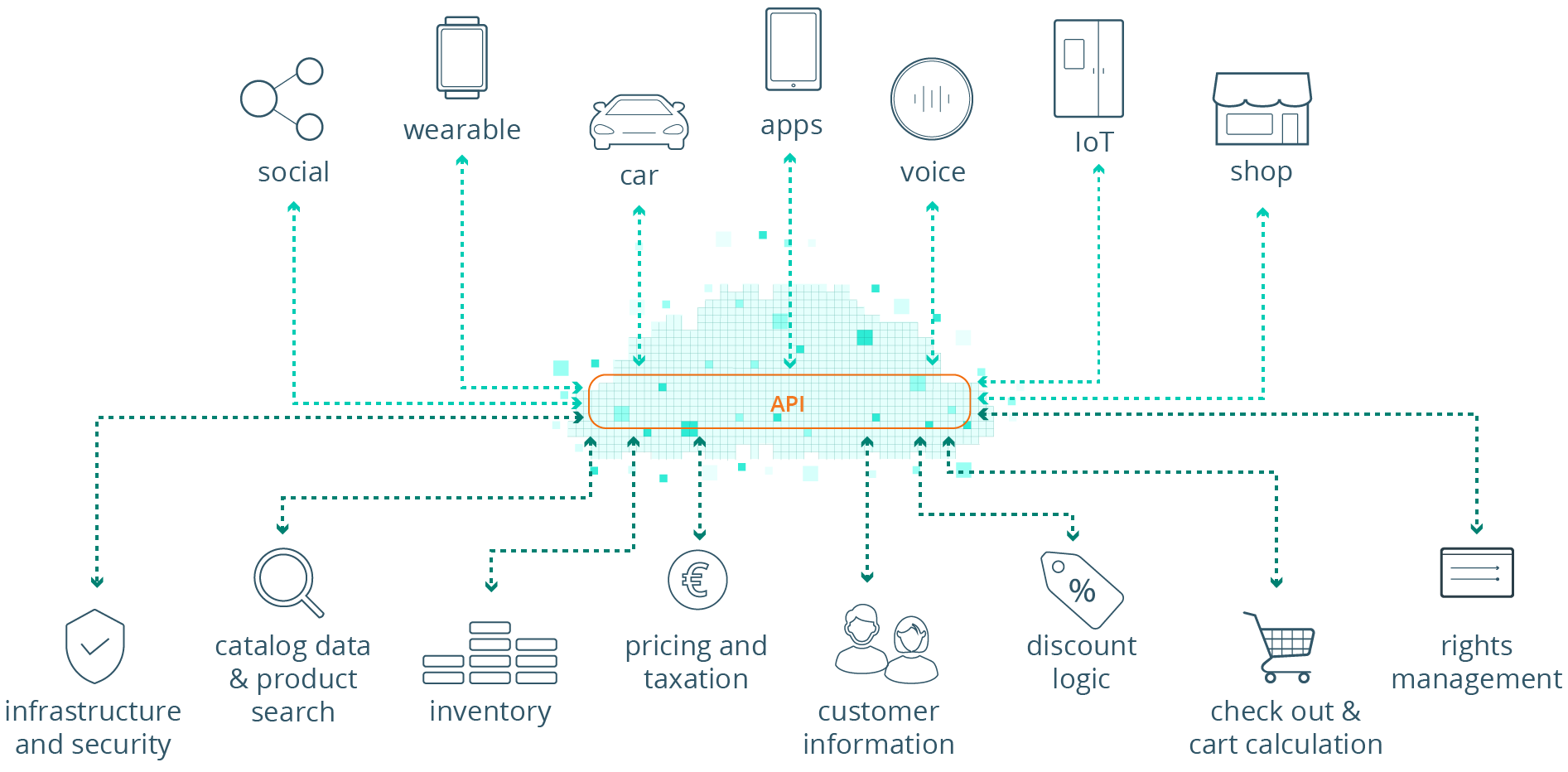
Headless commerce exampleThe front- and back-end systems can be custom-built, open source or enterprise-grade. A headless CMS is a program built to allow your marketing team to create and publish native-looking content across all of your channels, from web portals to digital billboards, without some of the complexities of interacting directly with front-end code.

Marketers can also use specialized content management systems (CMSs) and digital experience platforms (DXPs) to generate personalized recommendations and content built off customer data in your databases. The result is more meaningful experiences for shoppers, wherever they are.

The benefits of headless commerce

Omnichannel experience

Headless commerce allows retailers to offer a truly boundary-free shopping experience, with data that transcends device, and products and content displayed in ways best suited to their platform.

A Harvard Business Review study found that customers love omnichannel experiences, with customers spending more money and remaining more loyal to brands that offered them. A striking 73% of shoppers polled used multiple channels during their shopping journey—and that was well before the pandemic turbocharged our preference for online retail.

More flexibility

Traditional e-commerce platforms locked marketers and sales teams into specific designs and formats, making it difficult to adapt to new technologies and channels. A headless setup allows marketers to experiment with emerging technologies like smartwatches, launch timely marketing campaigns and more.

Faster updates

The distributed nature of headless architecture means updates to the front- and back-ends can be done independently, allowing developers to roll out new changes quickly, and without fear of breaking something else. Headless commerce also allows for faster testing of new code, leading to a more rapid rate of improvement.

Security and stability

The use of APIs to transfer information between front- and back-ends ensures that a minimum of data is exposed at any given time, and that attackers are unable to reach the back-end via one of the heads. The headless architecture also offers protection from crashes by separating the system’s various components. Errors can be isolated and fixed without impacting the entire system.

Getting started with headless commerce

Many of the biggest e-commerce platforms now offer headless commerce support. For the many retail sites built on Shopify’s back-end (including those here at Informatics), its Shopify Plus offering includes a suite of APIs built to help companies go headless without requiring a platform migration.

Other popular options include Adobe Commerce (Magento), BigCommerce and Commercetools, just to name a few. Each one brings its own strengths and unique capabilities, and it’s important to understand exactly what your business needs to accomplish with your system before deciding on a platform or deciding to build your own.

That’s what we’re here for—we can help you untangle all the options and possibilities, and develop a headless commerce strategy that engages your customers and boosts conversions. Reach out to our team of digital experts today for a free consultation!

Categories
Software Development Ui & Ux Designs Web Development

Say Hello to Our New Website

Say Hello to Our New Website

Jul 29, 2021 | Inside Informatics

Our latest website refresh melds the best in web design and digital marketing techniques. Design Director Jeff Stephens discusses the goals and thinking behind the project.

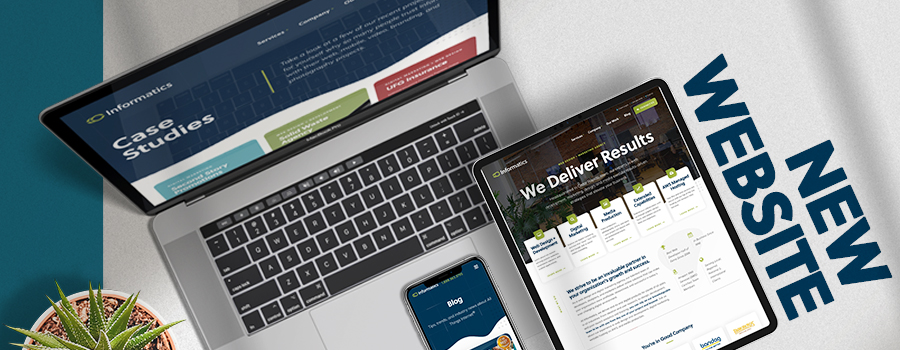
An illustration of Informatics' new website

It’s been a long time coming, but we are excited to finally unveil Informatics’ new website.

Our first refresh in more than three years, the new informaticsinc.com showcases the latest in corporate web design while also highlighting our best work and knowledge.

Users will find case studies, long-form blog posts and insights on “All Things Internet” from Informatics’ team of marketing and web development experts. They’ll also gain a fuller picture of all the different ways Informatics can elevate their business.

“Our struggle had always been how to showcase the breadth of our services,” says Informatics’ Design Director Jeff Stephens. “Basically, we do everything in web development and design in some capacity.”

The new site organizes more than two dozen service-focused landing pages and “mountains of information” among five high-level categories, allowing users to navigate all of our offerings without being overwhelmed by choices (a phenomenon known as Hick’s Law, Jeff notes).

Bold graphics, fluid page transitions and subtle animations create an “organic exploratory process,” he adds, while a heavy emphasis on statistics ties into the firm’s belief in data-driven design.

The new site also includes an assortment of user interface (UI) updates, including a new typeface, a refreshed flat logo and color palette, and interactive surprises such as staff-selected mouse-over GIFs on the “Who We Are” page.

“We were trying to make things fun, but still very functional and usable,” Jeff says. “It’s all about giving clients a preview of who we are as a company.”

Check out our new homepage and explore our breadth of services for yourself, and reach out to our design team when you’re ready to create your own unique brand statement.