Categories
Software Development Ui & Ux Designs Web Development

Website Development and Content Management Systems

Website Development and Content Management Systems

Jun 27, 2013 | Web Development

One of the popular tools for website development projects is a content management system or CMS. This is a fancy way to say you have the ability to update content on your website.

Website Development CMSOne of the popular tools for website development projects is a content management system or CMS. This is a fancy way to say you have the ability to update content on your website. The struggle many organizations face is being able to provide timely information to your users, customers, or clients. A content management system enables non-technical personnel the ability to update your website from an internet browser. This means no longer needing to contact your IT department, web developer or worse…learn HTML, just to make an update to your site.

So should you really consider a content management system for your next website development project? In short yes! Most CMS tools allow you to add or edit content pages. You also will be able to format content by adding images, files, links and much more. There are many different types of content managements systems available with different levels of features. Make sure to contact your web developer for suggestions prior to starting website development project.

The biggest advantage of including a content management system is the control you will gain over your website and messaging. Rather than just having a website, you will have an important tool in your marketing toolkit. For many organizations, a CMS means your website will be the one marketing channel that has the most current, up to date information about your company, products and services.

Categories
Software Development Ui & Ux Designs Web Development

What is Website Bandwidth?

What is Website Bandwidth?

Sep 18, 2014 | Web Development

A website’s bandwidth is a measurement of the amount of data a website uses during a specific time period. Bandwidth can be affected by the amount of traffic to a website and the number of resources a website has.

Bandwidthwebsite’s bandwidth is a measurement of how much data is transferred between your server and visitors’ devices in a given timeframe. This directly impacts website speed, user experience, and even search engine ranking.

Every business with an online presence needs to understand the importance of bandwidth along with strategies for optimizing its usage.

Why Does Bandwidth Matter

Think of bandwidth like a highway. A wider highway allows for more vehicles to travel simultaneously, leading to faster commutes. Thankfully, most website hosting platforms can upgrade your bandwidth much faster than it takes to rebuild a highway.

Unfortunately, if your website has insufficient bandwidth, it poses a significant risk to your business.

User Experience

Bandwidth directly affects how quickly users see your content. When your website has enough bandwidth to handle the number of users visiting and downloading items from your site, then pages load quickly and visitors stay engaged. Slow loading times, on the other hand, can lead to frustration and a high bounce rate – that’s when a visitor leaves your site without interacting.

But just how big of a deal can load time be? Pages that load in two seconds or less have an average bounce rate of 9%. If a page takes 5 seconds to load, the bounce rate increases to 38%.

Search Engine Ranking

Search engines give a leg up to websites that offer a positive user experience. Faster loading speeds result in a better user experience; therefore, faster loading speeds equate to an improved search engine ranking.

Cost Control

Most web hosting plans cap the bandwidth a website can use within a timeframe. Use more bandwidth than the plan allows, and you might see a significant upcharge. Often, the additional charges will be more costly than if you had upgraded your bandwidth allotment ahead of time. Optimizing bandwidth usage helps you stay on budget and avoid unexpected costs.

Understanding Bandwidth Usage

The amount of bandwidth your website consumes depends on two main factors:

Resource Size

Let’s call every element on your website a “resource,” from images, videos, and blog content, to stylesheets and fonts. Some of these resources are visible to users, and some are hidden on the backend, instructing the site how to appear and operate in real-time. Whether or not a resource is visually represented on the site, every single resource is comprised of units of information that must be transferred to visitors’ devices. Larger file sizes translate to more data that needs to be transferred from host to user – and that transfer requires bandwidth.

Website Traffic:

Bandwidth measures the transfer of information between host and user, so it follows that an uptick in users (traffic) means an uptick in bandwidth usage. And here’s where things get tricky, because your site may have both a maximum bandwidth capacity for simultaneous use – that’s the number of users visiting your site at the same time, as well as a monthly limit on the total bandwidth usage.

For additional information on how to optimize images, check out our blog and video section.
As always, feel free to contact Informatics with any questions you may have.

Calculating Bandwidth Usage

You can access developer tools on Google Chrome and see your page weight by disabling the cache and seeing how much data is transferred. Or you can visit a site like Pingdom and run a page weight test.

If you were to run a test on both the Google and YouTube homepages, you’d see that YouTube far outweighs Google, because hosting videos and dynamic content requires much larger file sizes than a simple search bar.

Once you’ve determined how much a page weighs, then determine how many typical page views you have. If your image-heavy page weighs 3 MB (megabytes) and you have 200 visitors at a time, then this would require at least 600 MB of bandwidth.

However, the risk of allocating only the minimum amount of bandwidth is running the risk of your site crashing or slowing down on the day that 201 visitors are on your site. Your calculation also needs to account for any downloads available on your site, and the frequency that users download those files – that’s additional data transfer.

Best Practices for Website Bandwidth Usage

Here are our top strategies and tools for optimizing bandwidth:

Optimize Fonts: While custom fonts can enhance your website’s visual appeal, they can also increase bandwidth usage. The great news is there are many web fonts designed for online use. They’re easily read and built for speed.

Choose High-Quality Images: Images are often the oversized “WIDE LOAD” semi-trucks on the bandwidth highway. This doesn’t mean getting rid of those stunning visuals, but you absolutely must optimize images for the web. This means reducing file sizes without sacrificing significant quality. There are many online tools dedicated to this task.

Compress Videos: Videos can soak up even more bandwidth than images. Rather than ditching video, you can use compression tools to find a balance that maintains video quality while reducing bandwidth usage.

Reduce Redirects: Redirects send visitors from one URL to another. While they have their uses, excessive redirects can slow down page load times and increase bandwidth usage. Aim for a clean and efficient URL structure.

Disable Unused Plugins: If you’re on a DIY web hosting service, like WordPress or Squarespace, there’s a good chance you played around with a variety of plugins, mixing and matching to get the functionality you needed. Did you disable the ones you don’t use? Unused plugins can add unnecessary weight to your website’s code and consume bandwidth.

Leverage Caching: Caching stores frequently accessed website elements on a user’s device. This way, subsequent visits don’t require downloading the same data again, reducing bandwidth usage. Site owners with backend experience can set how long information is cached on a user’s device.

Use Content Delivery Networks (CDNs): A CDN stores copies of your website’s static content across geographically distributed servers. It doesn’t replace web hosting, but it does allow users to access cached content from the nearest server, reducing the amount of data transferred (bandwidth usage) along with the load time. About 40% of the world’s top 1 million websites utilize CDN technology.

Minify Code: Website code can contain unnecessary characters and formatting that inflate file size. Minification removes these elements, resulting in a smaller file size and faster loading times. This should be done with caution or by a web design expert – any time you alter the site’s code, you run the risk of making a critical error.

Lazy Loading: Why waste bandwidth loading images at the bottom of a 2,000-word blog post when some users are bound to navigate away before they finish? Lazy loading delays the loading of non-critical resources on your webpage until they are scrolled into view by the user. This reduces the initial load time and bandwidth consumption. This is also a more advanced technique for the coders out there.

It takes time, energy, and money to create a website that works for your business. No matter how beautiful the images are, or how many wonderful products are offered, the website won’t work for you if it doesn’t achieve the speed users expect. Optimize your website’s bandwidth using these techniques, or get expert web design assistance at Informatics today!

Categories
Software Development Ui & Ux Designs Web Development

How to Spot a Domain Renewal Scam

How to Spot a Domain Renewal Scam

Mar 10, 2015 | Web Development

Have you ever received an email asking you to renew your domain from a company you have never heard of before? If so, you are not alone.

How to Spot a Domain Renewal ScamHave you ever received an email asking you to renew your domain from a company you have never heard of before? If so, you are not alone. There are companies that send emails like this every day in the hopes of taking over the ownership or getting money for a false domain renewal. Emails like this are simple but the primary goal is to create confusion so you just take action. Here are some helpful tips on identifying and protecting yourself against a domain scam.

How to Spot a Domain Renewal Scam

There are many different types of domain scams, here are just a few to be on the lookout for.

  • Similar DomainsIf you receive an invoice or email, make sure to check the domain carefully. It could be extremely close to your domain, for example, if your domain is example.com the invoice could be for examples.com or exmple.com. The scammer hopes that you don’t notice the difference and just pay the invoice.
  • Wrong RegisterThe domain could be correct but it’s coming from the wrong register company. One instance would be if you have registered your domain through godaddy.com but the notification or invoice is from a fake or different company. Make sure you are only working with the correct register.
  • Incorrect Expiration DateA notification could tell you that there are only a few days until your domain expires. The goal is to create fear that you will lose your domain if you don’t act now. Often times, the expiration date is incorrect. So, make sure you know when your domain will actually expire.

How to Protect Yourself from Domain Scams

It’s important to protect yourself from a domain scam. In most domain scams, confusion is the biggest goal. Here are a few things you can do to make sure you don’t get confused or caught by a domain scam.

  • Know Your RegisterA domain register is an organization where your domain is housed. A few common domain registers are Network Solutions, Go Daddy and Register.com. There are many others but these are the common ones.
  • Set the Administrative ContactOnce a domain is registered to an organization, ensure that an administrative contact within your organization is added to the domain. This person should be familiar with the domain and be able to make decisions regarding renewals.
  • Work with Your Website CompanyIf you have a single point of contact for all things related to your website you know who you are working with. If you receive a contact outside of that company it’s easier to spot a scam but more importantly, you can trust your domain will be returned in a timely manner.

If you need help determining who your domain registrar is or if an email you received is a scam, contact us today.

Categories
Software Development Ui & Ux Designs Web Development

3 Tips for Mobile-Friendly Website Navigation

3 Tips for Mobile-Friendly Website Navigation

Sep 8, 2015 | Web Development

There are best practices that you need to adhere to when creating your navigation structure for responsive design. So, when you start creating your sitemap, keep these things in mind.

3 Tips for Mobile-Friendly Website NavigationTaking all of your company’s products, services, and important information and condensing them into a streamlined sitemap can be a real challenge for a lot of companies. We have had clients create sitemaps with 8, 9 or 10 main navigation points! Of course, we take the time to explain the disadvantages of having such cluttered navigation and work with them to streamline their sitemap into one that is more usable.
Having a usable navigation structure means it is intuitivefunctional, and mobile-friendly. While 8 main navigation points may look just fine on a desktop, things don’t work as smoothly on a smartphone. There are best practices that you need to adhere to when creating your navigation structure for responsive design. So, when you start creating your sitemap, keep these 3 things in mind.

Keep Your Main Navigation Simple

bacon.jpg

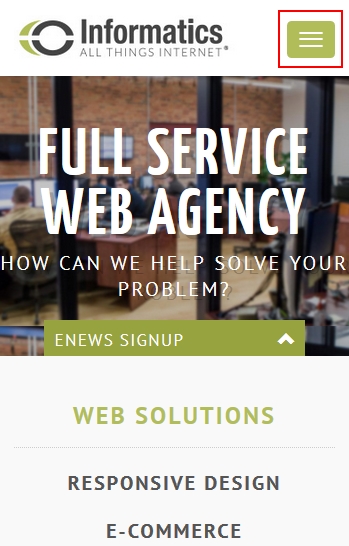
Generally speaking, too many navigation points can confuse the end user and clutter your design. And when it comes to responsive, the problem is amplified. There is limited real estate on a mobile device, meaning even less room for main navigation. Even though your main navigation can be collapsed into a hidden menu (what we call ‘the bacon’) you still don’t want to overcrowd it. Clicking on the bacon and being greeted with a list of 10 options will fill a smartphone screen, deterring the end user. Instead, try to keep everything in 3-5 main navigation points. With 3 you wouldn’t even need to create that collapsible menu.

Make All Main Navigation Clickable

Your main navigation is there to categorize the rest of the pages on your website and summarize that category. Some people prefer not to have the main navigation clickable because they find that the content will be repetitive. We highly recommend that all navigation points (main and otherwise) are clickable for several key reasons. First off, it helps with search engine optimization (SEO). This gives you the opportunity to add more content to your website and get found for keywords. Second, users expect to click on main navigation and so removing that capability can be confusing. Additionally, you can use that page to summarize what a user can find in the secondary navigation, making your overall sitemap more understandable.

Finally, this just doesn’t work in responsive design. When main navigation points are not clickable, they rely on the hover capability for users to see secondary navigation. Unfortunately, the hover capability is not possible in responsive design.

Hide Third-Level Navigation from Drop-Down Menu

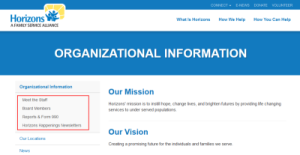
With long scrolling pages and jump links, third-level navigation is slowing disappearing from many websites. However, we understand that it is still desired by some who have deeper sites and a lot of information to share. Our biggest recommendation here is to hide the third-level navigation from the main navigation bar. Again, smartphones have limited real estate and breaking navigation down into three levels can be overwhelming and confusing for users. Instead, only show first and second level navigation in your main navigation bar and display third-level in a left side bar on your secondary pages.

horizons_small.png

As you move forward with your new sitemap for your website redesign keep these best practices in mind. After all, more and more people are accessing the web from their mobile devices and you want to give them the best viewing experience possible! If you need assistance with creating your site structure or redesigning your new website, contact Informatics today.

Categories
Data Security Software Development Web Development

5 Tips for Greater Password Security

5 Tips for Greater Password Security

Oct 6, 2015 | Web Development

What do “123456”, “password”, and “qwerty” have in common? If you answered with, “they are all passwords I use”, then it is time to make some changes. Because in fact, these three phrases were among the most popular passwords of 2014!

5 Tips for Greater Password Security What do “123456”, “password”, and “qwerty” have in common? If you answered with, “they are all passwords I use”, then it is time to make some changes. Because in fact, these three phrases were among the most popular passwords of 2014! It is very important that you follow a certain set of guidelines when creating passwords. Your passwords are used to protect your personal information, keeping your identity, business, and personal life safe and secure. For better password management, follow these 5 tips.
1. Use Different Passwords for Each Account

By using the same password for all of your accounts, you are at a much greater risk of exposing all of your important data. If a hacker is able to guess your password for one account, the next thing they will do is try that same password across all accounts. Make sure that you are using unique passwords across important accounts. If you have a hard time remembering all of the different passwords, then invest in a password management app. Such apps store all of your passwords and all you have to do is memorize one.

2. Change Your Passwords Monthly

Maintaining hard-to-crack passwords is all about keeping things fresh and staying ahead of the hackers. You can do this by resetting your passwords on a monthly basis. Make sure that when you change your passwords they are substantially different than before and avoid re-using a past password for one year.

3. Avoid Entering Passwords When Using Unsecured Wi-Fi Connections

You may come across unsecured Wi-Fi connections at places like the airport or a café. When using unsecured Wi-Fi connections, hackers can easily intercept your passwords or data. If you must do work while at the airport, access a secure, password-protected Wi-Fi connection. If you cannot get access to a secure connection, you better avoid completing any transactions or entering any passwords for the time being.

4. Utilize Multi-Factor Authentication

Multi-factor authentication is a newer, optional form of security used by many services. This process is used to verify your identity if someone logs onto your account from an unrecognized device. According to ConnectSafely, the “typical method is to send a text or other type of message to a mobile device registered to you with a code you need to type in to verity it’s really you. “ If you’re looking for that extra measure of security, we highly recommend implementing multi-factor authentication.

5. Include Numbers, Capital Letters, and Symbols

Creating passwords that are single words, children’s names or birthdates pose serious risks when it comes to hackers. These types of passwords are predictable and can be found through a quick Google search or by checking your social accounts. Instead, keep things easy to remember but hard to guess with a mix of numbers, symbols, and capital letters that mean something to you. While “IgfUIi2013!” means nothing to you, to me it means “I graduated from University of Iowa in 2013!” Take a phrase or a meaningful string of letters, numbers and symbols and create your perfect password.

For more password management tips, contact Informatics.

Categories
Software Development Ui & Ux Designs Web Development

5 Things to Know about Mobile Optimization in 2016

5 Things to Know about Mobile Optimization in 2016

Jan 21, 2016 | Web Development

Are you familiar with the biggest marketing trend of 2016? We are talking about mobile optimization, of course! Here we cover the 5 things you need to know about mobile optimization this year.

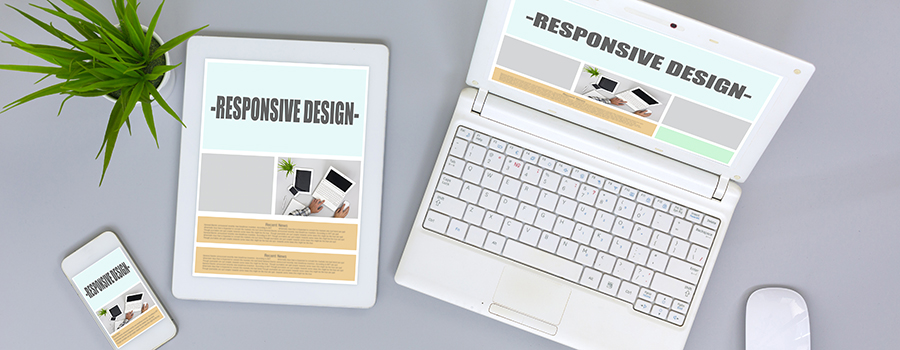
5 Things to Know about Mobile Optimization Are you familiar with the biggest marketing trend of 2016? We are talking about mobile optimization, of course! Here we cover the 5 things you need to know about mobile optimization this year.

Responsive Design

We have been saying it for a couple years now but having a mobile-friendly website is an absolute must in 2016. One way to do so is with responsive design. Responsive design refers to a website that dynamically resizes to fit the width of the device or browser that it is being displayed on. Ensure that your site is mobile-friendly and configured correctly by using this Mobile-Friendly Test. Because of this, your mobile marketing strategy requires search engine optimization (SEO) techniques of its own. To stay in Google’s good graces, optimize your site for local search with these tips:

  • Make contact info and addresses visible in mobile format
  • Use local keywords and phrases throughout your site content, Page Titles and Meta Descriptions.
  • Include localized terms along with the descriptions of the services you offer
  • Ask Customers how they found you

Mobile Advertising

Advertising specifically for mobile devices is a great way to reach new customers. We recommend experimenting with video pre-roll and/or Google AdWords’ text ads in 2016. Through AdWords you can target and exclude categories and keywords, demographics, interests and more. Plus, you only pay when a viewer watches your video!

Geolocation

Geolocation refers to the act of targeting your consumers by their location. This can include check-in apps like Facebook and Foursquare, local searches, as well as push notifications.

Here are a few ideas to help you get started with geolocation:

  • Geomarketing: show advertisements or location-based details to sell your services.
  • Special Offers: offer in store sales, discounts or coupons that are only available when a customer checks in at your location.
  • Make sure your business is active on Google+ (MyBusiness), Facebook, FourSquare, Yelp and other location-based services.

Looks like you should have all the tools you need to get started! If you need assistance with mobile optimization in 2016, please contact Informatics.

Categories
Software Development Ui & Ux Designs Web Development

Mobile Website vs. Responsive Design

Mobile Website vs. Responsive Design

Feb 9, 2016 | Web Development

Both responsive design and mobile websites are viable options. In this blog we explain the difference between the two options and which option will work best for you.

Mobile Website vs. Responsive DesignHaving a mobile-friendly website is a vital component of any digital marketing strategy. In April 2015, Google updated their algorithm to begin factoring in the mobile-friendliness of a given website. Other search engines followed suit shortly after. Since this time, many website owners have migrated to responsive design. Many who had mobile websites also took this opportunity to transition to a responsive design format. Both responsive design and mobile websites are viable options. In this blog, we explain the difference between the two options and which option will work best for you.

What is Responsive Design?

Responsive design refers to a website that is specially coded to automatically resize to fit the device it is being displayed on. Whether you pull a responsive website up on a desktop, tablet or smartphone, you will be greeted with an optimal viewing experience.

There are many benefits to having a responsive website. Developers find that the responsive website is the easiest and safest option because it uses only one domain. The back-end code is specially developed to detect the dimensions of a screen it is being accessed on and respond appropriately. This also means that updates to the main website will carry over across all devices. Responsive design also ensures that you are ready for whatever new devices may come our way!

What is a Mobile Website?

A mobile website is more or less a copy of your website, catered to mobile devices. Mobile websites use different domains than the main site and require maintenance of two separate codebases. The plus side to this is that you can create a unique experience on your mobile website. Unfortunately, the mobile website isn’t exactly future-ready. This means that new devices and browsers could potentially derail your mobile website down the road.

Which Should I Use?

Responsive design is typically the preferred option for mobile-friendly websites. However, your goals will dictate which makes sense for you. We generally recommend that clients go responsive when they are ready for a redesign. But that doesn’t mean that a mobile website isn’t an option. If you find that you want to create a completely unique experience on mobile, a mobile website may be the way to go. And if you currently have a mobile website and are not in a position to undergo a redesign, there is no need to fret. Mobile websites are still useful at this time and as long as you are mobile friendly, Google will reward you.

If you need assistance with going responsive, please contact Informatics. Our developers and designers would be happy to help!

Categories
Software Development Ui & Ux Designs Web Development

Landing Pages 101: Purpose and Framework

Landing Pages 101: Purpose and Framework

Feb 25, 2016 | Web Development

Starting a new digital marketing campaign? Don’t forget to consider your landing pages and fitting that page to your purpose.

Landing Page OptimizationLanding pages are a separate page on your website that is hidden from the website navigation. This allows it to be accessible only via a specific link which is useful to provide easy tracking of your campaign goals. Keep in mind that quality keyword-rich content and customized meta information are key elements to include. But the ease of tracking isn’t the only purpose for a landing page…


What is the Purpose of a Landing Page?

HubSpot found in their report benchmarking over 7,000 companies that organizations who increased their number of landing pages from 10 to 15 saw a 55% increase in leads. The number was even higher for companies with 40 or more landing pages.

The number of landing pages is not the secret, however. The name of the game is conversions. Whether your goal is to increase lawn and garden sales or to have people call to book an appointment, the page needs to aid that campaign and convert your prospects into customers. You only have 8 seconds to capture your audience so make sure that the landing page is thoughtful, targeted, and compelling.

Fit your Page to your Purpose

To get started with the framework of the landing page, here are just a few categories and their purposes:

  • Teaser: Think of this in terms of creating anticipation for an event or a launch. For example, a landing page to pre-order the next book in a popular series before it is released;
  • Squeeze: The title may not seem appealing, but the purpose of this type of page is to gain quality leads. For example, signing up for a webinar or newsletter to add emails for your email marketing campaigns;
  • Infomercial: This type of page will include all the information about a specific product or offer. This is your chance to showcase the product, so make it about the specific item that the prospect is expecting to find when they click through; and
  • Viral: This category of page is geared more toward brand awareness. Once you select a framework for the page that makes sense for your campaign, remember that you need to be intentional with your content. Looking for more information on landing pages?

Stay tuned for an upcoming blog on best practices and content for landing pages.
If you are ready to start and are operating on a Concrete5 5.6 Content Management System, take a look at this bog on how to put together your page.

If you would like assistance with reviewing or creating landing pages, please contact Informatics.

Categories
Software Development Ui & Ux Designs Web Development

Landing Pages 101: The Big Picture

Landing Pages 101: The Big Picture

Mar 1, 2016 | Web Development

Starting a new digital marketing campaign? Follow these big picture concepts when creating your landing pages.

Landing PageLanding pages are a separate page on your website that is hidden from the website navigation. This allows it to be accessible only via a specific link which is useful to provide easy tracking of your campaign goals. Last week’s blog discussed the purpose and framework for landing pages. To complete the picture, read below for tips to keep in mind when designing and creating content for your landing page…


A Targeted Picture

When a customer comes through the link, they have already completed the first step towards conversion, but you only have about 8 seconds to convince them to stay. With that in mind, the clear and singular goal for this landing page should be geared to the prospect that arrives there. If the conversion goal is to sell a product, then don’t try to add the prospect to an email subscription list.

All prospects are not the same, and they do not consume information the same way. When you are creating the message to acquire the prospect, be sure to A/B test. Does your target audience respond better to a message emphasizing urgency or are they more interested in convenience? When you have acquired the prospect and they have landed on your page, make sure that you are carrying that message through. Don’t underestimate the power of testing. Through it you can hone your message to appeal to a particular audience that you want to grow whether it is new homebuyers or retirement age travelers.

A Consistent Picture

The landing page should be part of a consistent, seamless transition toward the goal. When the customer clicks on a sale for a specific product, make sure that is what they find when they land there. Remember you have 8 seconds to keep the prospects on your site. You promised to deliver something to them when they clicked through to your site and if they feel you haven’t delivered on that promise in less than 8 seconds, they will move on.

A page that has a consistent picture will be free of distractions. There are a number of things that can distract the prospect from the one goal to convert including low quality images, improper grammar, and links within your content to other offers or information on your site. On the other side of that coin, it is good practice to help direct the prospects attention.

A Strategic Picture

When you create your page, know where you want the prospect to go next. Are they entering all their information at once to get a quote or are they moving through a three step process? Guide the prospect through the steps toward conversion through the use of creative and visual cues, but make sure to track their actions.

The landing page may have been created, but that doesn’t mean the work is done. Collect the tracking information and study the metrics to make sure that your prospects are converting. When you find a problem area, adjust quickly and make the campaign work for you.

If you would like assistance with reviewing or creating landing pages, please contact Informatics.

Categories
Software Development Ui & Ux Designs Web Development

Waterfall vs. Agile Methodology: Which is Right for Your Web Project?

Waterfall vs. Agile Methodology: Which is Right for Your Web Project?

May 20, 2016 | Web Development

Every web project is different – very different. In an effort to maintain a process and keep things on track, developers will follow one of two popular methodologies: waterfall or agile.

Waterfall vs. Agile MethodologyEvery web project is different – very different. In an effort to maintain a process and keep things on track, developers will follow one of two popular methodologies: waterfall or agile. The methodology your developer takes should depend on your project needs and goals. However, some developers will choose the approach that best fits their personal needs. We recommend against this. At Informatics, we take the time to learn about your project before implementing waterfall or agile methodology. To help you better prepare for your next web project, start thinking about which approach best suits you.

The Waterfall Methodology

The Waterfall Methodology, or the traditional approach, is defined by Segue Technologies as a “linear approach to software development”. In other words, developers follow steps in a specific order, moving from top to bottom (hence the name waterfall). There are typically distinct stages of development in this approach wherein each stage finishes before the next one can begin.

The stages may look similar to this:

  1. Discovery & Requirements Gathering
  2. Design
  3. Coding
  4. Testing (Multiple forms)
  5. Launch

One major advantage to the Waterfall Methodology is that it provides a straightforward plan of action and understanding of deliverables. A disadvantage is that the Waterfall Methodology requires specific details upfront which can sometimes be difficult to gather and intimidating for the client.

The Agile Methodology

Segue Technologies defines the Agile Methodology as an “iterative, team-based approach to development”. This approach relies on a high-level of customer involvement as deliverables are being completed, reviewed and evaluated by the developers and client on an ongoing basis. This approach entails a lot more back-and-forth between the team and client.

An advantage to Agile Methodology is that the customer has the opportunity to work directly with the project team, continually providing feedback and seeing updates in near real-time. However, customer involvement can also be a disadvantage when the customer does not have the time or interest to be involved at such a high level.

Which One is Right for You?

If your company would like to be directly involved in the web project, continually providing feedback, reviewing builds and suggesting updates, then the Agile Methodology of development is for you. On the other hand, if you do not have a team member dedicated to this level of involvement, the Waterfall Methodology may be best. In this case, you will be heavily involved upfront and can be looped back in whenever deadlines are met and deliverables are provided.

Contact Informatics for your next web project and we will work with you to determine which approach is best.