


An Ecommerce website development offers a great opportunity to earn money online. Launching an online business has numerous benefits, such as lower startup costs, reduced operating expenses, and access to a larger audience. Moreover, creating an online store is simple, even for individuals without technical expertise. All you need is a dependable Ecommerce website development company, Ecommerce hosting service, a domain name, and a platform.
In this article, we’ll cover 6 essential steps for Ecommerce website development.
Latest Ecommerce Market Statistics – Key Facts and Figures
Ecommerce continues to grow rapidly, providing businesses with countless opportunities to expand their customer base. Here are some recent facts and figures that highlight the current state of the worldwide Ecommerce market:
- Revenue in the eCommerce Market is projected to reach US$4,324.00bn in 2025.
- Revenue is expected to show an annual growth rate (CAGR 2025-2029) of 8.02%, resulting in a projected market volume of US$5,887.00bn by 2029.
- With a projected market volume of US$1,383.00bn in 2025, most revenue is generated in China.
- In the eCommerce Market, the number of users is expected to amount to 3.6bn users by 2029.
- User penetration will be 42.4% in 2025 and is expected to hit 49.1% by 2029.
- The average revenue per user (ARPU) is expected to amount to US$1,559.00.
Need of an Ecommerce Website Development
Looking at the statistics above, it’s clear that the expanding Ecommerce market offers significant benefits for businesses. Now, let’s dive into the key advantages of Ecommerce websites that provide businesses with extensive opportunities to reach their target audience.
- Extending Your Global Presence: Creating an Ecommerce website allows your business to reach a worldwide audience. You can offer your products and services to customers across the globe, overcoming geographical limitations.
- Operating 24/7: Your Ecommerce store is accessible to customers at all times, allowing them to shop whenever they want, which in turn increases your sales potential.
- Building Your Brand Identity: An Ecommerce site boosts your business’s online presence, attracting potential customers and enhancing brand recognition among digital shoppers.
- Improving Customer Convenience: Online shopping provides customers with the ease they desire. They can explore products, read reviews, compare prices, and make purchases from the comfort of their homes.
- Expanding Marketing Opportunities: Ecommerce offers cost-effective marketing solutions, allowing retailers to increase their reach, enhance brand visibility, attract new customers, and boost sales without heavy investment in traditional advertising.
- Delivering Personalized Shopping Experiences: By leveraging customer data from Ecommerce platforms, businesses can offer tailored shopping experiences that make customers feel valued and encourage repeat business.
- Secure Transactions: Although online transactions face risks like cyberattacks and fraud, Ecommerce sites can ensure security through fraud protection, encryption, data safeguards, and secure payment gateways.
6 Crucial Steps for Successful Ecommerce Website Development
Whether you’re looking to launch a clothing brand or build a booking site for your service-based business, the following section outlines six essential steps for Ecommerce website development.
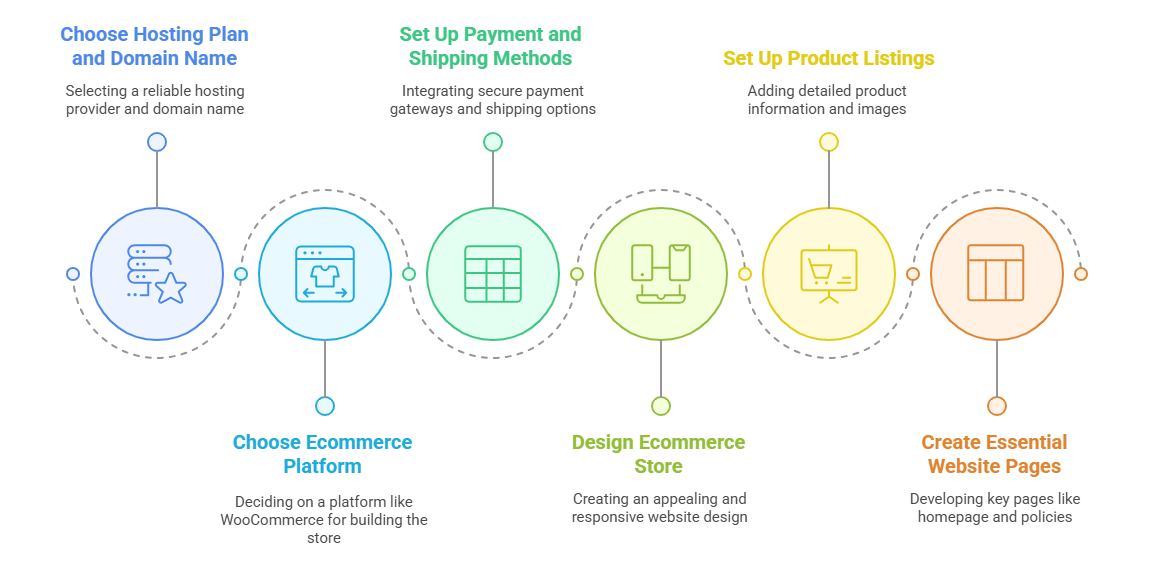
1. Choose a Hosting Plan and Domain Name
Web hosting is essential for making your business accessible online. It stores the files of your Ecommerce store and ensures they are available to visitors.
However, with so many hosting providers to choose from, it can be difficult to find a trustworthy one. Although budget-friendly options might seem tempting, remember that they could restrict the functionality of your Ecommerce site.
Here are key factors to consider when choosing a web hosting provider:
-
- Uptime Guarantee: Choose a provider with at least 99.9% uptime to avoid downtime, which can impact sales and SEO.
- Speed and Optimization: Fast load times improve user experience and SEO. Look for hosts with under 200 MS server response time and strong CDN support.
- Bandwidth: Higher bandwidth allows for more traffic. opt for hosts offering unlimited bandwidth for optimal performance.
- Storage: Ensure enough storage for content like images and videos to avoid running out of space.
- Security: Look for providers with strong security features like SSL certificates, firewalls, and automated backups.
- Ease of Use: A user-friendly control panel can simplify account management.
- Customer Support: A reliable provider should offer 24/7 support and resources like a knowledge base for self-help.
2. Choosing a Platform for an Ecommerce Website Development
Ecommerce platforms or website builders make it easy to create an online store without complications. These tools allow you to design your website, enhance the shopping experience, and simplify daily operations. When choosing a platform, consider factors such as cost, features, and ease of use. Take the time to evaluate different options to find the one that aligns with your business model and supports future growth.
If you’re already using WordPress or plan to, the WooCommerce plugin is a great choice. This free, open-source plugin transforms your site into a fully functional online store after activation. WooCommerce provides a wide range of Ecommerce features, such as customizable store themes, built-in SEO tools, payment gateway integrations, and shipping carrier options. The platform is user-friendly, and once the plugin is installed, you can follow an easy setup process to have your online store up and running.
3. Set Up Payment and Shipping Methods
Setting up a secure payment gateway, whether online or offline, is crucial for handling transactions safely. Most Ecommerce platforms come with built-in payment integrations, such as WooCommerce Payments for WooCommerce. Additionally, they often support various third-party payment processors like PayPal and WooCommerce Stripe.
Make sure not to forget about collecting sales tax by configuring the tax zones and unit tax rates. Afterward, you can automate tax calculations for your transactions using sales tax software like Quaderno or Avalara.
Moreover, your potential customers will be interested in the fulfillment and shipping options available in your Ecommerce store. In addition to integrating shipping services, business owners can explore alternatives such as curbside pickups.
4. Design of Your Ecommerce Store
The design of your Ecommerce website is crucial in conveying your brand message. As a result, think carefully about how you use fonts, colors, and layouts to appeal to your target audience. With pre-designed WordPress themes and website builder templates, business owners no longer need to begin from scratch.
These themes and templates simplify the process of designing eCommerce sites, enabling you to modify every element without needing to code. As Ecommerce transactions made through mobile phones are projected to reach 43.4% by the end of 2025, we recommend selecting a responsive Ecommerce template to ensure your online store loads seamlessly across all devices.
5. Set Up Product Listings
The product listing page provides customers with details about the items or services available for purchase. Usually, product listings feature:
-
- Product names and pricing
- Product images or videos
- Descriptions of the products
- Customer reviews
- Shopping cart options
- An FAQ section
Since media files grab visitors’ attention, ensure your listings include high-quality product images. You don’t necessarily need to hire professionals for product photography. Here are a few tips for taking appealing product photos:
-
- Clarify your concept: A great approach is to present products within a lifestyle setting. For instance, if you’re selling outdoor equipment, capture your product in natural surroundings. This approach emphasizes the features and advantages of the product.
- Prepare your gear: To capture high-quality product images, it’s worth investing in a good camera and a stable tripod. If you’re shooting indoors, make sure your lighting setup is optimal.
- Set up the scene: Organize the area, take test shots, and rehearse the process to ensure everything runs smoothly during the photoshoot.
- Capture the product images: Take shots from various angles so that potential customers can view the product from different perspectives.
- Enhance the images: In this final step, business owners can make adjustments to improve the image quality.
6. Essential Ecommerce Website Pages
To attract and convert visitors, your website’s key pages should be accessible and well-designed. Here are important pages to focus on:
-
- Homepage: Your homepage is the first impression for most visitors, so it should be clear, engaging, and quick to load. Use compressed media to speed up loading and include easy navigation with product categories and a search bar.
- About Us: This page shares your brand’s story and mission, helping build trust with customers and attract partners. Highlight your company’s background and values and introduce your team to humanize your brand.
- Contact Us: Make your contact details easily accessible to build trust. Include phone, email, and address, and consider using a contact form for lead generation.
- FAQ: Address common customer questions, like shipping or order tracking, and use a search bar to help visitors find information quickly.
- Privacy Policy: Clearly display your privacy policy to ensure compliance and transparency. Place it in high-visibility areas like checkout pages.
- Return and Refund Policy: Provide clear return/refund guidelines, listing non-returnable items and the process for requesting returns or exchanges.
- Shopping Cart & Checkout: Keep carts organized with product details and transparent cost breakdowns. Ensure easy form filling and offer guest checkout for smoother purchases.
Ecommerce Website Development Cost
Let’s divide the overall Ecommerce website development cost into two categories:
- Fixed Costs: These include ongoing expenses such as domain registration, web hosting, developer wages, and the salaries of engineering staff.
- Variable Costs: Depending on your budget, you have the flexibility to decide the website’s design, performance, features, and capacity. You can minimize variable costs by keeping your spending low.
| Website Size | Estimated Cost Range |
|---|---|
| Small (Up to 100 products) | $1000 to $10000 |
| Medium (100 to 500 products) | $10000 to $50000 |
| Large (500+ Products) | $50000 to $200000 |

Conclusion
Ecommerce website development offers numerous advantages, creating a mutually beneficial situation for both businesses and customers. Creating an ecommerce website for your business accelerates the buying process, simplifies product listing creation, boosts customer trust, ensures 24/7 availability, and increases sales.
You can also opt for custom ecommerce website development or use pre-built themes for your site. For more guidance, consider connecting with a Ecommerce web development company that can provide expert support throughout your web development journey.
FAQs
How do I determine what features my ecommerce website needs?
To determine the necessary features, assess your business model and goals. Create a list of features that align with your customer journey.
What does an ecommerce website developer do?
Ecommerce developers ensure a smooth and secure shopping experience, handling everything from backend programming to frontend design. Their role varies based on your store’s needs.
What is Ecommerce website development cost?
The cost varies based on required features, the platform selected, and whether you hire a professional team. Basic websites tend to be cheaper, while those with more advanced features are more expensive.
How can I ensure my e-commerce website is mobile-friendly?
Use a responsive design, incorporate large buttons and readable fonts, and test your site on various devices. Most modern platforms, such as Shopify, offer mobile-friendly templates by default.